One of the first questions new podcasters ask is:
“What’s the best software to record my podcast?”
The honest answer is: there is no single best tool.
There is only the right tool for where you are in your podcasting journey.
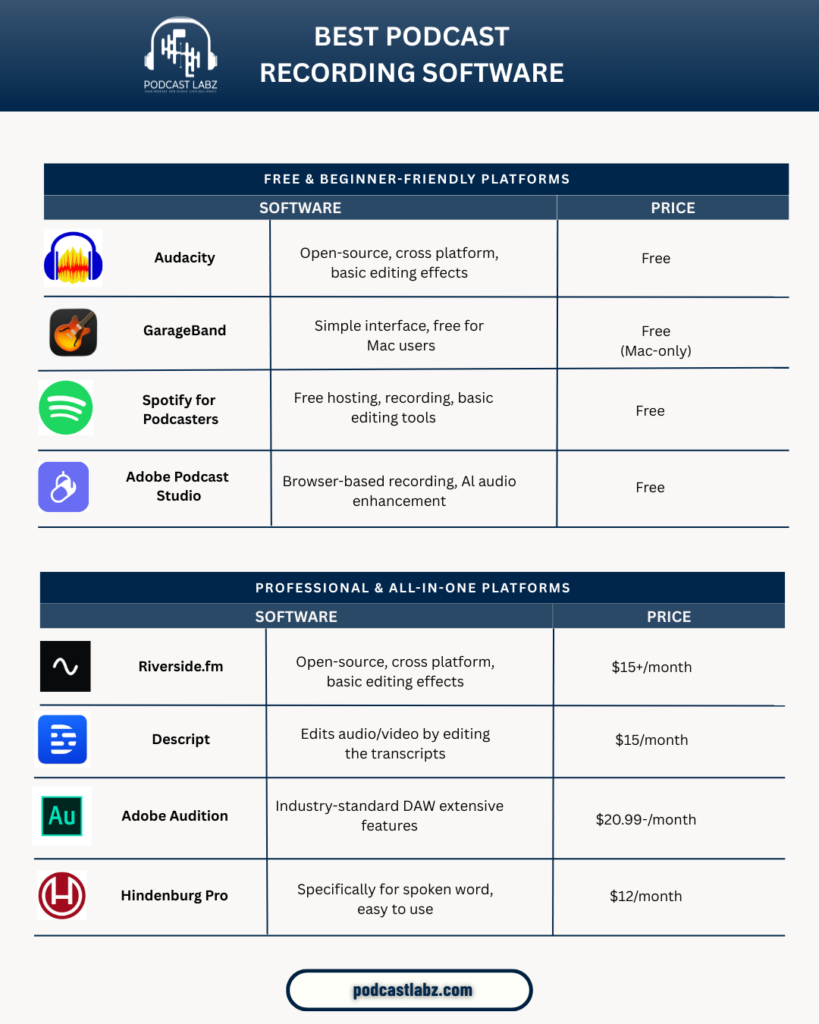
Below is a clear comparison of some of the most popular podcast recording platforms, broken down into beginner-friendly tools and professional all-in-one platforms.
Free & Beginner-Friendly Podcast Recording Software
These tools are ideal if you’re just getting started, testing an idea, or working with a tight budget.
Audacity
Audacity is a powerful open-source audio editor that works on Windows and Mac.
It’s great for basic recording and editing, but the interface can feel overwhelming for beginners. There’s no built-in remote recording or video support, so it works best for solo podcasts.
Best for: DIY podcasters who don’t mind learning the basics of audio editing.
GarageBand
GarageBand is a clean, simple option for Mac users.
It’s intuitive, beginner-friendly, and great for recording clean audio quickly. However, it’s limited to Apple devices and lacks advanced podcast-specific features.
Best for: Solo podcasters using Mac who want a simple setup.
Spotify for Podcasters
Spotify for Podcasters offers free recording, hosting, and basic editing tools in one place.
It’s extremely accessible, but customization and audio control are limited compared to professional tools.
Best for: First-time podcasters who want everything in one free platform.
Adobe Podcast Studio
This browser-based tool shines because of its AI audio enhancement.
It’s excellent for improving voice quality quickly, though it’s not a full editing solution.
Best for: Podcasters who want fast, clean audio without complex editing.
Professional & All-in-One Podcast Platforms
If you’re publishing consistently, interviewing guests, or recording video podcasts, these tools offer much more control and quality.
Riverside.fm
Riverside records high-quality local audio and video, even with remote guests.
It’s one of the best tools for professional-grade recordings, especially for video podcasts.
Best for: Interview-based podcasts and creators focused on video quality.
Descript
Descript lets you edit audio and video by editing text.
It’s a powerful tool for content repurposing, social clips, and fast edits, though it still requires some learning.
Best for: Podcasters who want speed and transcript-based editing.
Adobe Audition
Adobe Audition is an industry-standard digital audio workstation used by professionals.
It offers deep control over sound quality, noise reduction, and advanced editing but comes with a learning curve.
Best for: High-quality, polished podcasts that need professional post-production.
Hindenburg Pro
Hindenburg is designed specifically for spoken-word content.
It simplifies audio leveling, loudness, and clarity, making it a favorite among journalists and podcast producers.
Best for: Podcasters who care about storytelling and clean dialogue.
So… Which One Should You Choose?
• Just starting out? Free tools are enough.
• Recording interviews or video? Go professional.
• Want your podcast to sound consistent and credible? Editing matters more than the tool.
Great podcasts aren’t defined by software alone.
They’re defined by clarity, pacing, and storytelling.
That’s where a professional podcast editor makes the difference.
Final Thought
Your recording software helps you capture the conversation.
A podcast editor helps shape the experience.
If you’re recording episodes but struggling with editing, consistency, or polish, that’s a sign it might be time to hand post-production off to a professional.
If you’re building a podcast and care about quality, feel free to connect.
Happy to share insights or help you find the best setup for your show.